
This Flipwise review explains why I use the platform to manage the operational side of my reselling business.
It is not a comparison roundup and it is not a list of the best reseller tools. It is simply a record of a system I adopted after running into the limits of spreadsheets and manual tracking.
If you sell occasionally and only manage a small number of items, spreadsheets will probably continue working perfectly well.
But as inventory grows and sales start happening across multiple marketplaces, the data side of the business becomes harder to manage.
Flipwise is the system I now use to organise that side of the business.
Flipwise does not currently run an affiliate program. I use it because it helps manage inventory, sales data, and record-keeping across my reselling operation.
Quick Summary
Flipwise is a management platform designed specifically for resellers.
I use it to replace the spreadsheets and manual tracking systems that most resellers rely on when they first start selling.
It connects directly to my eBay account using the eBay API and automatically records sales made there. Sales from other marketplaces such as Vinted, Etsy, Depop, or cash sales can still be recorded manually so everything stays in one system.
If your reselling activity is small and simple, spreadsheets will probably still work.
But once inventory grows and you want a clearer view of profit, inventory value, and business performance, Flipwise becomes a much easier way to manage the business.
Decision Context
Most resellers start with spreadsheets.
Inventory is tracked manually, purchase prices are recorded in columns, and profit calculations are added when an item sells.
At the beginning this works perfectly well.
But as the business grows the spreadsheet becomes harder to manage. The spreadsheet slowly turns into its own system that needs constant updating.
Inventory increases, items are listed across multiple marketplaces, and tracking fees, shipping costs, and profit becomes more complicated.
Eventually the spreadsheet stops being a simple record and becomes a system that requires constant maintenance.
That is usually the point where resellers start looking for software designed specifically for managing a reselling business.
Flipwise exists to replace that manual system with something built around how resellers actually operate.
Many resellers eventually build their own systems to understand fees, margin, and pricing. I explain the working models I use for that in my reseller tools and calculators.
What Flipwise Does
Flipwise is a reseller management platform designed to organise the operational side of a reselling business.
Instead of maintaining multiple spreadsheets and relying on marketplace dashboards, Flipwise centralises inventory, sales, and financial data in one place.
In practical terms it allows resellers to:
- manage inventory across listings
- track sales and profitability
- organise purchase information
- record expenses and marketplace fees
- analyse business performance over time
The goal is not simply to record data but to make it easier to understand how the reselling business is performing.
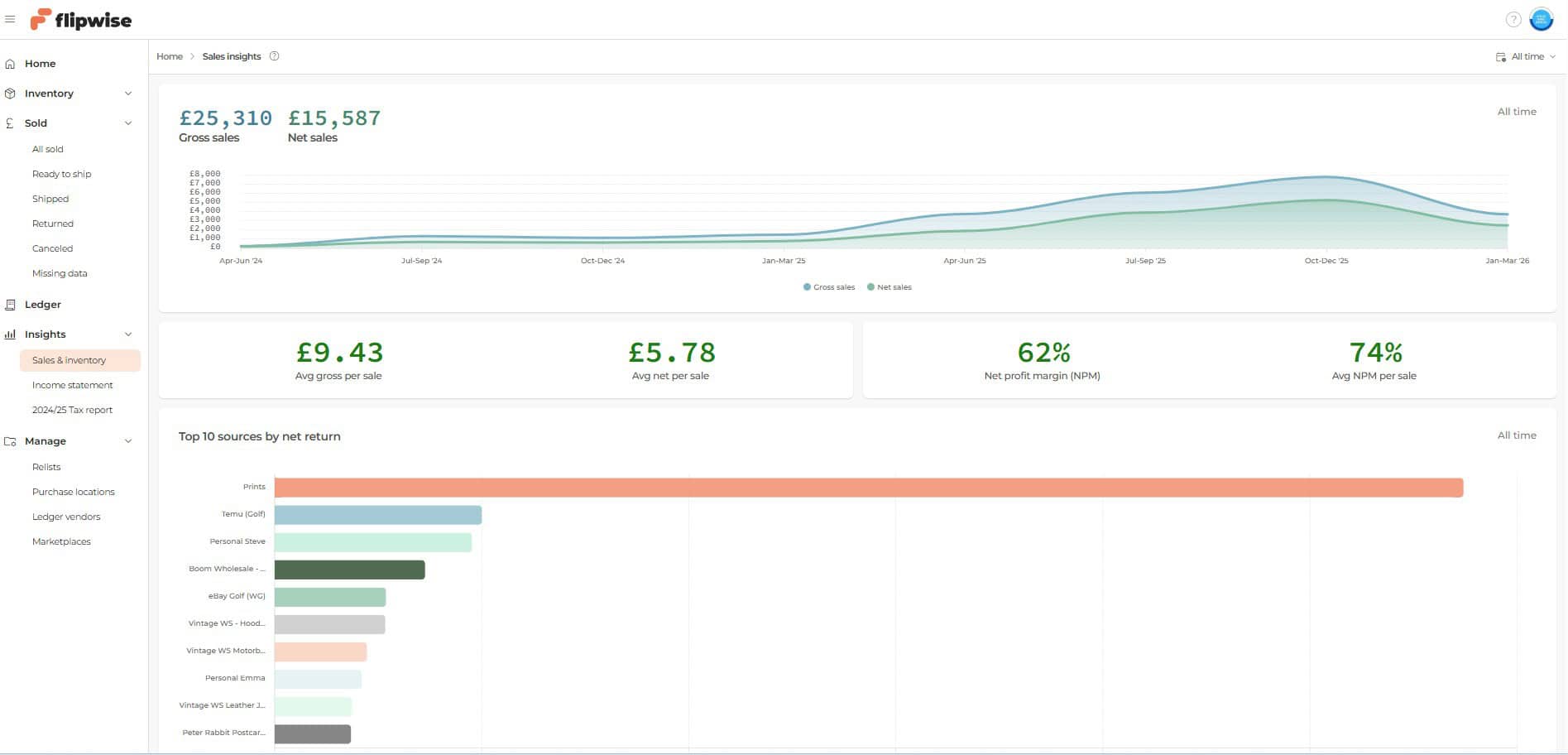
Flipwise Sales & Inventory Dashboard
This is the Flipwise Sales & Inventory dashboard. It shows listings, sales activity, and key business metrics such as net sales and products sold.
Marketplace Integration
Flipwise connects directly to eBay using the eBay API.
During setup I followed a simple wizard that asked me to log into my eBay account and grant Flipwise permission to access the account.
Once that authorisation is completed, Flipwise can access data such as:
- listings
- inventory
- sales transactions
This allows sales made on eBay to be recorded automatically.
Flipwise currently integrates directly with eBay, but not with the other marketplaces I sell on.
Instead I record those sales manually.
Off-eBay Sale Entry Form
Flipwise includes a simple form for recording sales made outside eBay.
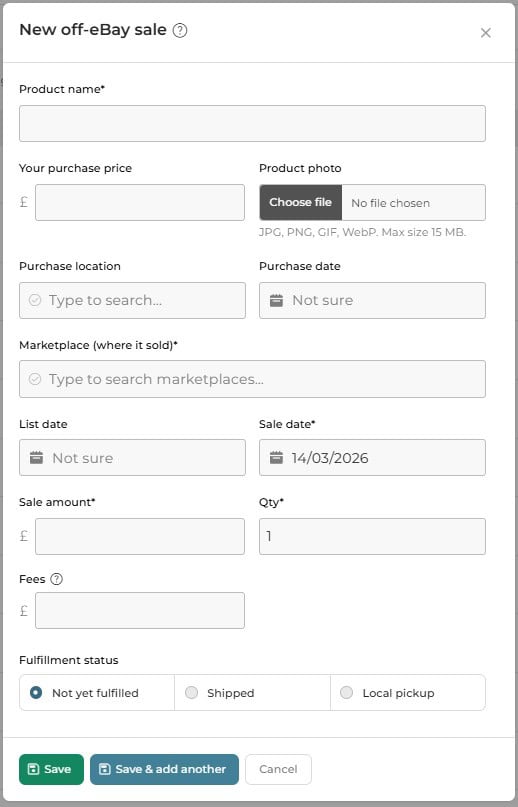
For my workflow that includes:
- eBay — automatic through the API
- Vinted — entered manually
- Etsy — entered manually
- Depop — entered manually
- cash sales or other marketplaces — entered manually
Even though these sales are entered manually, they still become part of the same dataset inside Flipwise.
Recording Sales From Other Marketplaces
When I sell something outside eBay, Flipwise allows me to record the sale using a simple form.
The form includes fields for:
- product name
- purchase price
- marketplace where the item sold
- sale amount
- fees
- sale date
- fulfilment status
Once saved, the sale becomes part of the business records and is included in reporting and profit calculations.
This allows Flipwise to maintain a complete picture of the business even if sales happen across different platforms.
Proof I Use It
I joined Flipwise on 4 June 2024.
Since then it has replaced the spreadsheets I previously used to track inventory and sales.
My current subscription supports 1,000–1,999 listings, which reflects the scale of inventory I now manage.
That scale is where manual spreadsheets begin to become difficult to manage, which is exactly why I adopted a dedicated system.
How I Use Flipwise Day to Day
Flipwise functions as the operational hub for the reselling business.
Typical daily activities include:
- recording inventory purchases
- tracking items listed for sale
- monitoring items that have sold
- reviewing profit and expenses
- organising business records
When I purchase an item, I enter the purchase cost and inventory information into Flipwise.
If the item sells on eBay, the sale and associated data are recorded automatically.
If the item sells on another marketplace, I record the sale manually using the off-eBay sale form.
This keeps the entire business history in one system rather than scattered across multiple spreadsheets.
What Flipwise Replaces
Most resellers build their own tracking systems using spreadsheets.
Typical spreadsheets include columns for:
- purchase price
- listing price
- sale price
- marketplace fees
- shipping costs
- final profit
At small scale this works well.
But as inventory grows and sales become more frequent, maintaining these spreadsheets becomes time consuming and error-prone.
Flipwise replaces that manual structure with a system designed specifically for managing reseller data.
Business Insights Flipwise Provides
One of the biggest benefits of Flipwise is the ability to see how the business is performing.
The platform includes several reporting tools that summarise how the business is performing.
For example, the income statement can be generated for any time period and shows:
- total revenue
- marketplace breakdown of sales
- inventory purchases
- marketplace fees
- shipping costs
- additional expenses
- net income
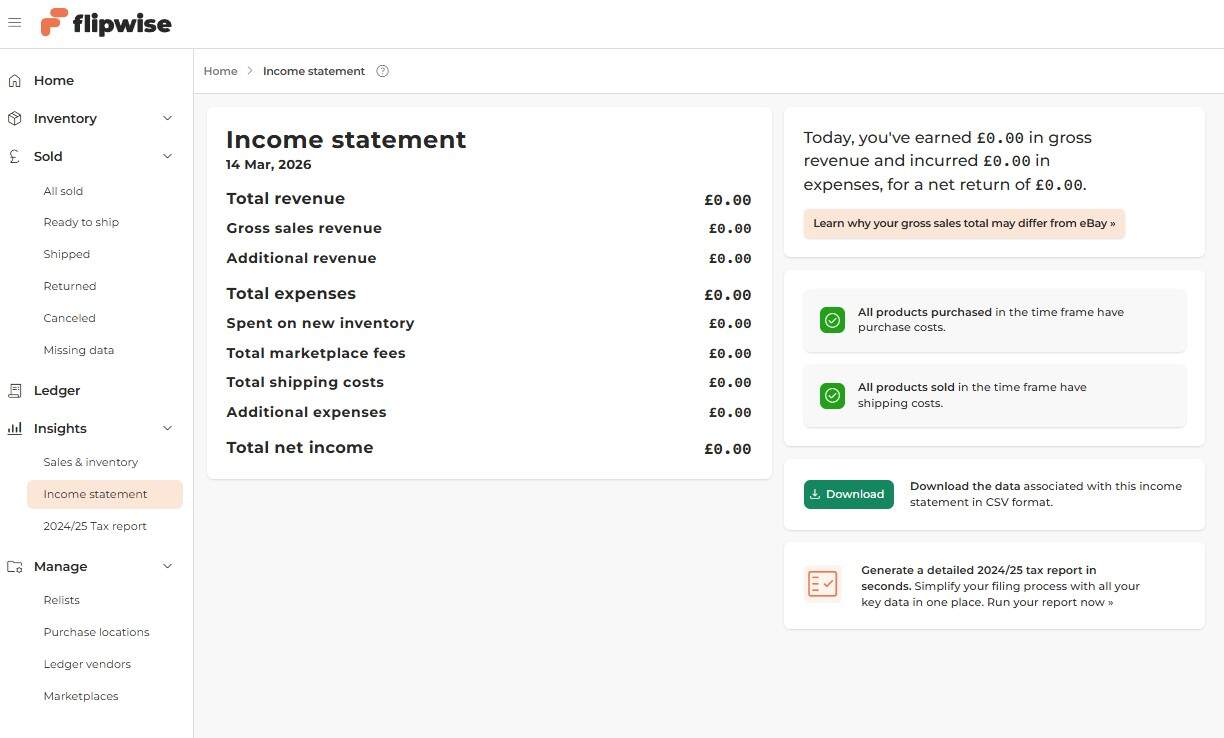
Flipwise Income Statement Report
This is the income statement report generated inside Flipwise.
The system can also show metrics such as:
- profit per item
- sales performance
- inventory value
- average return on investment
- net profit margin
These reports make it much easier to understand how the business is performing over time.
Who Flipwise Works Best For
Flipwise makes the most sense for resellers who:
- sell regularly across online marketplaces
- manage growing inventory
- want better visibility into business performance
- are currently relying on complex spreadsheets
- want to organise the operational side of their business
For these situations a dedicated system becomes increasingly valuable.
Who Should Avoid It
Flipwise may not be necessary if you:
- sell occasionally
- manage very small inventory
- are comfortable maintaining simple spreadsheets
- prefer completely manual tracking systems
In those cases the additional structure may not be worth adopting.
Pricing Reality
Flipwise pricing is based on the number of items it considers “under management” in your store.
To calculate this, Flipwise counts:
- your active listings
- plus items sold in the last 30 days
This determines which pricing tier your account falls into.
At my current store size of just over 1,000 items, I am on the 1,000–1,999 listing plan, which costs $39.99 per month.
That works out at roughly $0.04 per item per month, and the cost drops slightly as inventory increases within the tier.
| Listings managed | Monthly price |
|---|---|
| 0–24 | Free |
| 25–99 | $9.99 |
| 100–499 | $19.99 |
| 500–999 | $29.99 |
| 1,000–1,999 | $39.99 |
| 2,000–4,999 | $49.99 |
| 5,000–9,999 | $59.99 |
| 10,000–19,999 | $69.99 |
| 20,000+ | Contact Flipwise |
Flipwise calculates store size using active listings plus items sold in the last 30 days, so the tier may move slightly as inventory changes.
What This Means in Practice
For small resellers the free or lower tiers are usually enough.
As inventory grows, the subscription scales with the size of the store.
In practice the real question is not simply the monthly price, but whether the platform replaces the spreadsheets and manual tracking systems you would otherwise maintain.
Pros
- designed specifically for resellers
- connects directly to eBay using the API
- centralises inventory and sales data
- replaces complex spreadsheets
- provides useful business insights and reporting
Cons
- subscription cost
- learning a new system
- direct integration currently focused on eBay
When I Would Stop Using Flipwise
I treat tools like Flipwise as infrastructure.
If a tool stops aligning with how I run the business, I replace it.
I would reconsider using Flipwise if:
- the system became difficult to maintain
- the cost stopped making sense relative to the value
- better alternatives appeared
- managing the business manually became simpler again
So far the tool has remained useful because it simplifies the operational side of the business and makes my life much easier than using spreadsheets.
Getting Started With Flipwise
For resellers considering Flipwise, the setup process is straightforward.
The basic steps are:
- create an account
- connect your eBay account through the authorisation wizard
- begin recording inventory purchases
- track sales and review performance
In my experience the system was easy to learn.
I watched the tutorial videos on the Flipwise YouTube channel and spent some time exploring the interface, and the workflow became clear almost immediately.
FAQ
Do resellers need a tool like Flipwise?
Not necessarily. Many resellers operate successfully using spreadsheets. Tools like Flipwise become more useful as inventory and sales volume grow.
Does Flipwise only work with eBay?
Flipwise connects directly to eBay using the API. Sales from other marketplaces can still be recorded manually.
Can Flipwise replace spreadsheets?
For many resellers that is exactly the goal. Instead of maintaining multiple spreadsheets, the data is organised in one structured system.
Is Flipwise necessary for beginners?
Probably not. Beginners can usually manage with simple tracking methods before adopting dedicated reseller software.
Conclusion
Flipwise exists to solve a problem many resellers eventually encounter.
As a reselling business grows, the operational side of tracking inventory, sales, and profitability becomes increasingly complex.
Spreadsheets work for a long time, but eventually they reach a point where maintaining them becomes a task in itself.
For resellers managing larger inventory and selling across multiple marketplaces, Flipwise provides a structured system designed specifically for organising the business side of reselling.
It is not essential for every reseller, but for those managing growing inventory and sales data, it can make the operational side of the business significantly easier to manage.