Perfmatters is a lightweight WordPress performance plugin focused on disabling unnecessary features rather than layering heavy optimisation systems. In this Perfmatters review I explain why it has remained part of my WordPress stack for several years.
I use it to keep sites fast without turning performance into an ongoing project. For content-first WordPress sites, it is one of the simplest ways to reduce front-end bloat.
If you are evaluating WordPress performance plugins and want something lightweight rather than a full caching suite, this Perfmatters review explains how and why I use it.
It is not a speed optimisation tutorial and it is not a promise of perfect performance scores. It is simply the tool I rely on to reduce unnecessary bloat and keep sites responsive without turning performance into an ongoing project.
If you prefer reducing unnecessary scripts at the source rather than layering optimisation plugins on top, this approach may suit you.
I use Perfmatters alongside GeneratePress and GenerateBlocks as part of the same lightweight stack.
GeneratePress plays the same role on the theme side. It keeps the base WordPress installation lightweight so performance decisions remain simple.
I follow the same philosophy with my SEO setup. Instead of installing complex optimisation suites, I rely on a lightweight plugin that stays out of the way. I explain why in my Slim SEO review.
This post contains affiliate links. I chose this plugin before becoming an affiliate and would continue using it regardless. You can view my affiliate disclosure for more detail.
What Perfmatters Does
Perfmatters is designed to remove unnecessary work from WordPress rather than add more optimisation layers.
Instead of focusing on caching or compression, it focuses on disabling features, controlling scripts and reducing front-end bloat.
In practical terms, it gives you control over which parts of WordPress load on your site and which parts do not.
Perfmatters handles the performance layer of the WordPress stack I use.
Proof of Ongoing Use
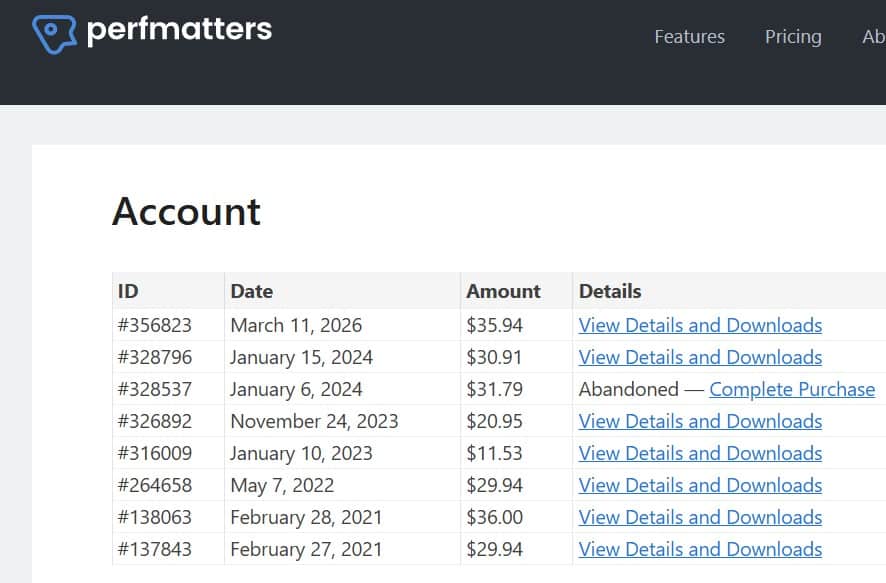
I first purchased Perfmatters in February 2021.
Since then, I have renewed annually and adjusted licence tiers as my site portfolio evolved. My account history includes multiple renewals across both personal and business plans, with an active subscription extending into 2027.
If a performance plugin introduces instability or unnecessary complexity, I remove it. Through WordPress updates, theme changes and hosting adjustments, Perfmatters has stayed.
That consistency matters more to me than test scores.
The Problem I Was Trying to Avoid
WordPress performance can easily become a rabbit hole.
It is easy to:
- Install multiple optimisation plugins
- Chase PageSpeed Insights scores
- Labour over GTmetrix waterfall reports
- Tweak settings repeatedly
- Retest and repeat
I went through that phase.
There was a period where I would review waterfall charts, adjust settings, retest and tweak again. It is very easy to turn performance into a project in itself.
The problem is that improving test scores does not always translate into meaningful improvements for real users. Constantly revisiting optimisation settings adds another layer of maintenance.
Rebuilding a performance stack later is far more disruptive than keeping it simple from the start.
What I wanted was not maximum optimisation. It was control.
Specifically:
- The ability to disable things I do not use
- Remove unnecessary scripts
- Stop WordPress doing work my sites do not need
- Keep performance predictable without constant attention
Perfmatters fits that role.
Why I Didn’t Keep Stacking Optimisation Plugins
Over the years I have tried different approaches.
I have used WP Rocket. I have used Autoptimize. I have experimented with layering plugins to improve scores and reduce load times.
They work.
The issue was not whether they improved metrics. The issue was complexity.
Stacking optimisation plugins introduces:
- Overlapping features
- Harder troubleshooting when something conflicts
- More settings to revisit over time
- More moving parts after WordPress updates
Performance can quietly become a maintenance cycle.
Over time I moved toward a much smaller plugin stack overall because it reduces conflicts and makes troubleshooting far easier.
At some point I tested Perfmatters and found that it suited how I prefer to manage performance. It felt more direct. Instead of focusing primarily on caching layers, it focused on disabling unnecessary features and reducing front-end bloat at the source.
The interface was clearer for the kind of control I wanted. It made it easier to see exactly what was being disabled and why.
That simplicity is what led me to keep it.
How I Actually Use Perfmatters
I do not treat Perfmatters as a tuning playground.
Once configured, it is mostly left alone.
The areas I rely on most include:
- Disabling unused WordPress features
- Controlling script loading
- Reducing front-end bloat
- Keeping page behaviour predictable
In practice, I routinely disable features such as:
- WordPress emojis
- XML-RPC where it is not required
- Dashicons on the front-end
- Unnecessary embeds
- Scripts loading site-wide when they only need to load on specific pages
These are small adjustments individually, but together they reduce unnecessary front-end work and keep behaviour consistent.
The goal is not perfection. The goal is stability.
Where Perfmatters Works Well
Perfmatters works particularly well if you want to simplify your performance stack rather than expand it.
In my experience the main advantages are:
- Clear control over unnecessary WordPress features
- The ability to disable scripts that load site-wide by default
- A lightweight interface that avoids excessive configuration
- Consistent performance without constant retesting
Where It Is Less Useful
Perfmatters is not designed to replace every performance tool.
You may find it less useful if you:
- Prefer a single plugin that handles caching, optimisation and CDN integration
- Run a heavy page builder site with large amounts of animation and dynamic content
- Want a fully automated “speed optimisation” solution without manual decisions
Why This Matters in Practice
I am not chasing perfect Lighthouse scores.
What I care about is:
- Pages loading quickly for real users
- Consistent performance across devices
- Not having to revisit performance every few months
Hosting also plays a major role here. Even the best optimisation plugin cannot compensate for slow infrastructure, which is why I treat hosting costs as part of the performance equation.
Perfmatters helps keep sites in a good place by default. That is more valuable to me than occasional spikes in synthetic test scores.
Every commercial site I run is content-first. Performance matters because it supports usability and revenue, not because it looks impressive in a report.
Support and Ongoing Development
One of the reasons I am comfortable keeping Perfmatters in my stack is the consistency of its support and development.
The documentation is clear and written in plain language. Each setting explains not just what it does, but why you might enable or disable it.
When I have needed clarification, answers have been straightforward.
Brian Jackson, who develops Perfmatters, is visible and active. He regularly answers questions and explains feature decisions. That visibility matters because it signals the product is actively maintained by someone who understands performance in practical terms.
For infrastructure tools, long-term viability matters as much as features. A well-supported plugin reduces uncertainty over time.
Who Perfmatters Suits
Perfmatters makes sense if you:
- Run content-first WordPress sites
- Prefer reducing unnecessary features at the source
- Want fewer optimisation plugins rather than more
- Care about predictable performance over chasing scores
- Treat your site as a commercial asset
This approach suits content-first commercial sites that are not built around heavy page builders or animation-driven design.
When a site supports digital products or memberships, performance is not just cosmetic. It directly affects usability and revenue.
Who It Is Not For
Perfmatters is unlikely to suit you if:
- You want a single plugin that handles all caching and optimisation automatically
- You prefer visual dashboards that promise instant speed improvements
- You are running a heavy page builder site and expect one plugin to solve structural issues
- You enjoy constant performance tuning
It is not a magic speed switch. It is a control layer.
Perfmatters Pricing
Perfmatters is a paid plugin.
I am comfortable with that because:
- It replaces multiple smaller tweaks
- It reduces future maintenance
- It simplifies my performance stack
I treat it as infrastructure, not an optimisation hack.
If you want to review the current pricing and see exactly what settings Perfmatters gives you control over, you can explore the plugin in more detail on the official site.
What Would Make Me Remove Perfmatters
I am not attached to any tool.
I have lifetime licences for frameworks and plugins I no longer use. When something stops aligning with how I build, I move on.
I would remove Perfmatters if:
- It introduced unnecessary complexity
- It overlapped heavily with server-level optimisation
- It required constant retuning
- It stopped aligning with a simplified stack
So far, the opposite has been true. It has remained focused and predictable.
Is Perfmatters Worth It?
I use Perfmatters because it keeps performance predictable without turning optimisation into ongoing work.
Once configured, it stays in the background. That is exactly where infrastructure belongs.
If you prefer reducing unnecessary scripts at the source rather than layering optimisation plugins on top, Perfmatters is worth reviewing in more detail before expanding your performance stack further.